Keeping Your Salesforce Data Clean: A Complete Guide with DataSyncX
Maintaining accurate and organized Salesforce data is critical for business efficiency. Dirty or duplicate data can lead to misinformed decisions, wasted resources, and poor customer experiences. Fortunately, with the right tools and approach, managing your Salesforce data can be straightforward and effective.
In this blog, we’ll explore the importance of clean Salesforce data, common challenges, and how DataSyncX Cleansing Functionality can simplify the process.
Why Salesforce Data Quality Matters
Better Decision-Making Accurate data ensures your reports, dashboards, and analytics reflect the real state of your business.
Increased Productivity Duplicate or outdated records slow down your team. Clean, organized data allows them to focus on valuable work.
Improved Customer Relationships Correct and up-to-date data ensures smooth interactions with customers, avoiding frustration caused by duplicates or outdated information.
Common Challenges in Salesforce Data
Duplicate Records: Multiple entries for the same contact, account, or lead.
Incomplete Records: Missing critical information such as email addresses or phone numbers.
Inconsistent Formatting: Variations in name, address, or phone number formats.
Outdated Information: Leads or contacts that are no longer relevant.
DataSyncX Cleansing Functionality: Simplifying Salesforce Data Management
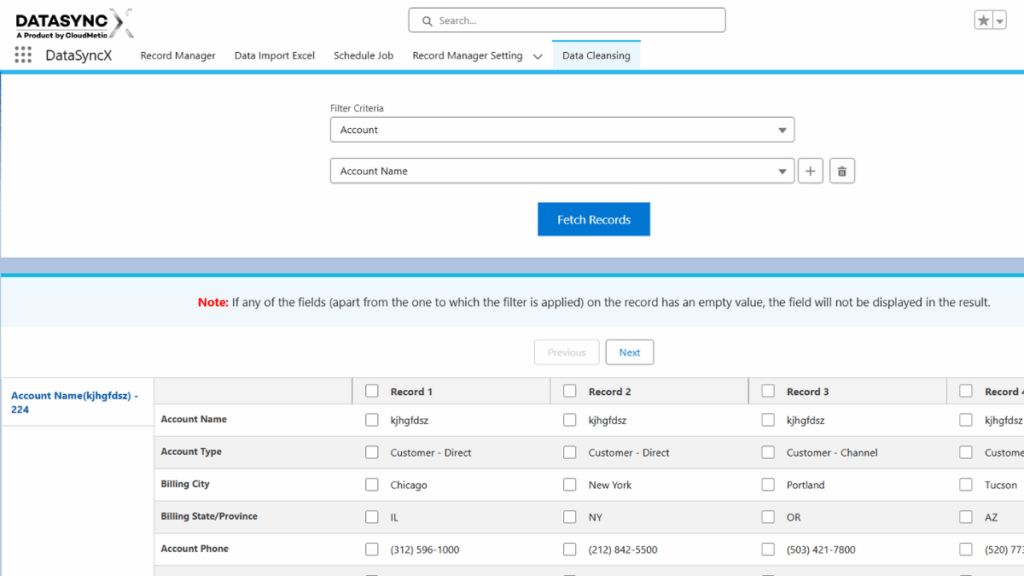
DataSyncX offers a robust solution to keep your Salesforce records accurate and consistent. Its Cleansing Functionality allows you to:
Detect and Merge Duplicates Automatically identifies duplicate records and merges them while retaining the most accurate information.
Perform Bulk Cleaning Handle thousands of records at once, saving hours of manual work.
Set Custom Rules Apply rules for fields, formats, or record types according to your organization’s standards.
Keep Data Updated in Real-Time Continuous validation ensures your Salesforce database stays reliable over time.
User-Friendly Interface An intuitive interface makes managing and cleaning data simple for teams of all skill levels.
Best Practices for Clean Data with DataSyncX
Schedule Regular Cleansing: Keep your database clean consistently with automated routines.
Backup Before Changes: Always create backups to prevent accidental data loss.
Monitor Data Quality: Track duplicates, missing fields, and inconsistencies.
Educate Your Team: Ensure everyone follows data entry standards to maintain quality.
Conclusion
Clean and organized Salesforce data is the backbone of efficient business operations, accurate reporting, and positive customer experiences. DataSyncX Cleansing Functionality automates and streamlines the data management process, allowing your team to focus on growth and strategy rather than manual cleanup.